
How to Get Verified on OnlyFans Fast (No Rejections)

Leo Vance
Published: Aug 11, 2026 • 9 min read
How to Get Verified on OnlyFans Fast (No Rejections)
Few experiences in the creator journey are as disheartening as preparing your brand, capturing introductory content, setting up your subscription profile, and then receiving an automated message reading: "Your identity verification was rejected."
Getting stuck in the verification rejection loop is an extraordinarily common hurdle for aspiring creators. Because OnlyFans operates as a licensed global financial entity handling billions of dollars in consumer payments, the platform must comply with the most stringent Know Your Customer (KYC), anti-money laundering (AML), and age verification standards in digital media.
The rejection is rarely personal. In the vast majority of cases, applications are rejected not by human compliance officers, but by automated biometric artificial intelligence systems flagging minute document discrepancies, reflective glare, or mismatched metadata.
In this exhaustive operational masterclass, we break down the exact biometric mechanics behind platform verification, outline the four golden rules to ensure first-time approval, explain how to connect external social accounts for immediate validation, and provide a comprehensive troubleshooting guide for every known rejection error.
Why OnlyFans Verification Is Exceptionally Strict
To successfully navigate the approval process, creators must understand the regulatory environment governing OnlyFans and its parent corporation, Fenix International Ltd.
The platform utilizes advanced biometric scanning technologies provided by enterprise identity verification partners (such as Ondato, Sumsub, and Yoti). These systems are engineered to accomplish three mandatory compliance objectives:
- Absolute Age Verification (18+ Requirement): Federal and international statutes strictly mandate that zero minors access or monetize digital media platforms. The verification AI cross-references document birthdates against digital databases and facial age-estimation neural networks.
- Fraud and Impersonation Prevention: The system matches the live 3D geometry of your face against the photographic portrait printed on your government document, preventing identity theft, catfishing, and unauthorized likeness exploitation.
- Statutory 18 U.S.C. 2257 Compliance: For creators producing adult or glamour content, federal regulations require verified proof of age and legal identification maintained on permanent file for every individual appearing in published media.
Your submission must satisfy an algorithm configured for zero-tolerance security. Providing clean, pristine visual data is the key to effortless approval.
The 4 Golden Rules for First-Time Approval
Treat your OnlyFans verification application with the same meticulous precision you would apply when submitting an official government passport renewal. Follow these four non-negotiable rules:
1. Document Selection: What OnlyFans Accepts (and What It Rejects)
OnlyFans accepts only physical, unexpired, government-issued photo identification.
- Acceptable Primary Documents: Valid National Passport, Real ID / State Driver's License, or National Identity Card.
- Strictly Prohibited Documents: Student IDs, work badges, military IDs (due to security encryption restrictions), expired licenses, paper temporary driving permits, birth certificates, or digital photocopies/scans.
The document must be physically present in your hands. Uploading a photograph of a computer screen displaying a digital ID will result in an immediate permanent rejection.
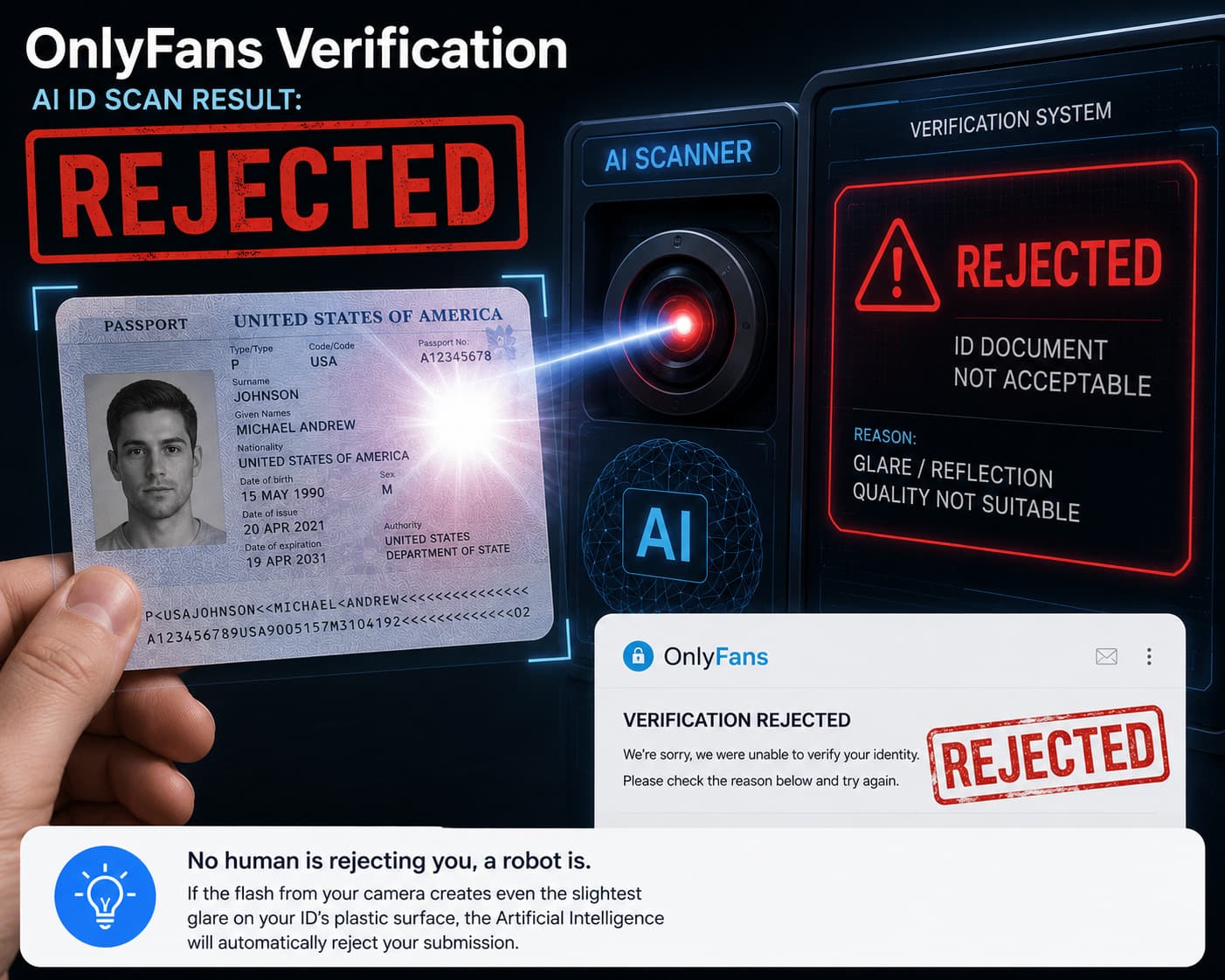
2. Eliminating Camera Flash and Reflective Glare
Document rejection is overwhelmingly caused by improper lighting. Modern driver's licenses and passports feature holographic security laminates and high-gloss plastic coatings.
When taking your document photo:
- Disable your camera's automatic flash entirely. Flash creates an opaque white reflection across the laminate, obscuring critical alphanumeric characters (such as expiration dates and document numbers).
- Place your ID flat on a neutral, non-reflective surface (such as a dark wooden table or matte paper).
- Position yourself near a window with abundant natural daytime light, ensuring no heavy shadows fall across the text.
- Ensure all four corners of the card are fully visible within the frame. Cropping even a single millimeter off an edge causes the automated boundary detection to fail.
3. Mastering the Biometric Live Selfie
The secondary verification step requires taking a live selfie holding your government ID positioned next to your face.
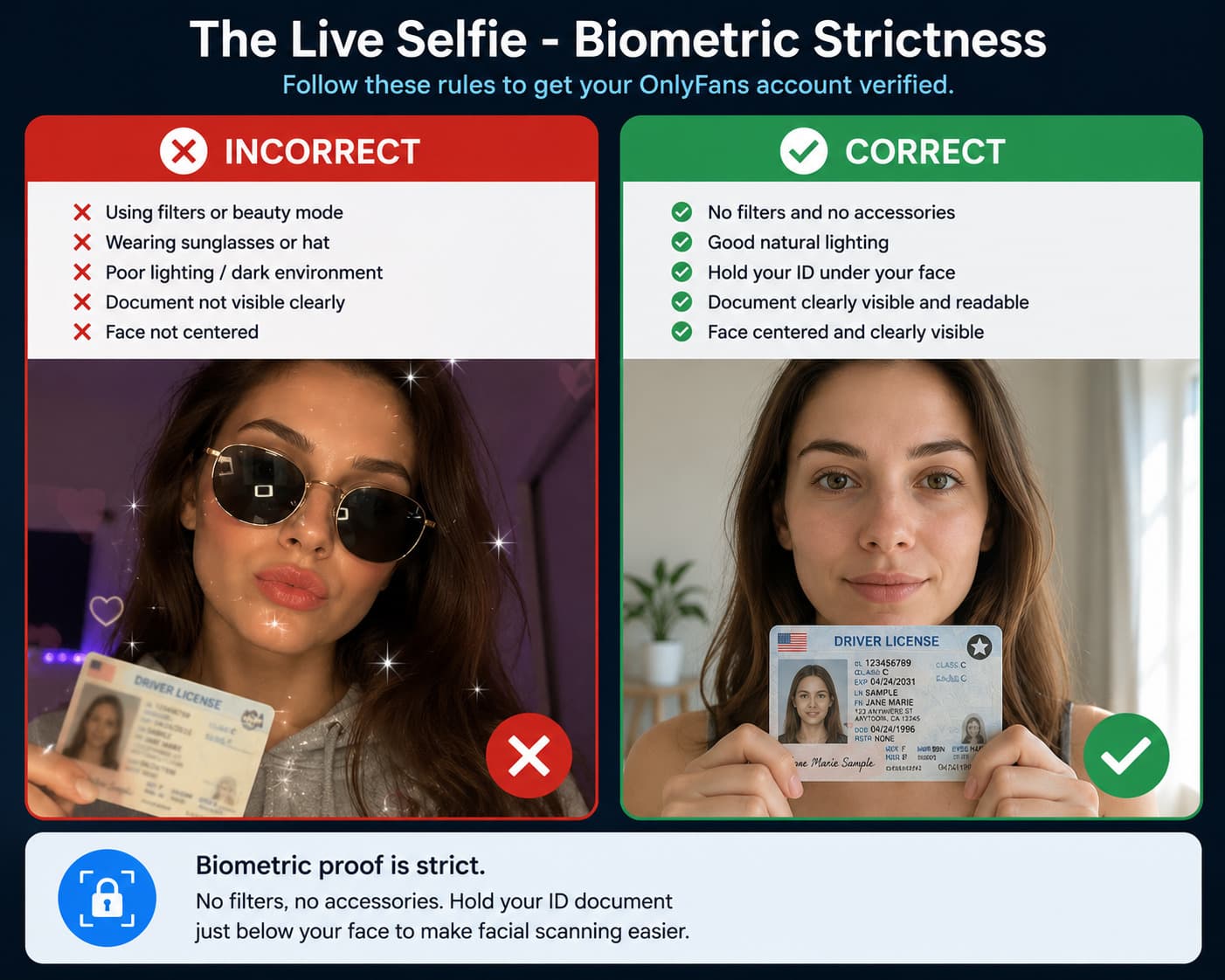
This is a strict biometric facial mapping test:
- Zero Digital Filters: Disable all beautification filters, skin smoothing, and color grading apps. Use your phone's native camera.
- Remove Facial Accessories: Take off eyeglasses, sunglasses, hats, beanies, or bulky jewelry that might alter facial geometry.
- Proper Document Grip: Hold the ID card between your thumb and index finger by the outer edge. Never allow your fingers to obscure your name, photo, birthdate, or document number.
- Facial Alignment: Hold the card directly beneath your chin or slightly to the side of your cheek. Look directly into the camera lens with a neutral facial expression under balanced lighting.
4. Avoiding the Empty Profile Trap
Many creators submit their verification request while their OnlyFans profile is completely blank, lacking a profile avatar, header banner, and bio description.
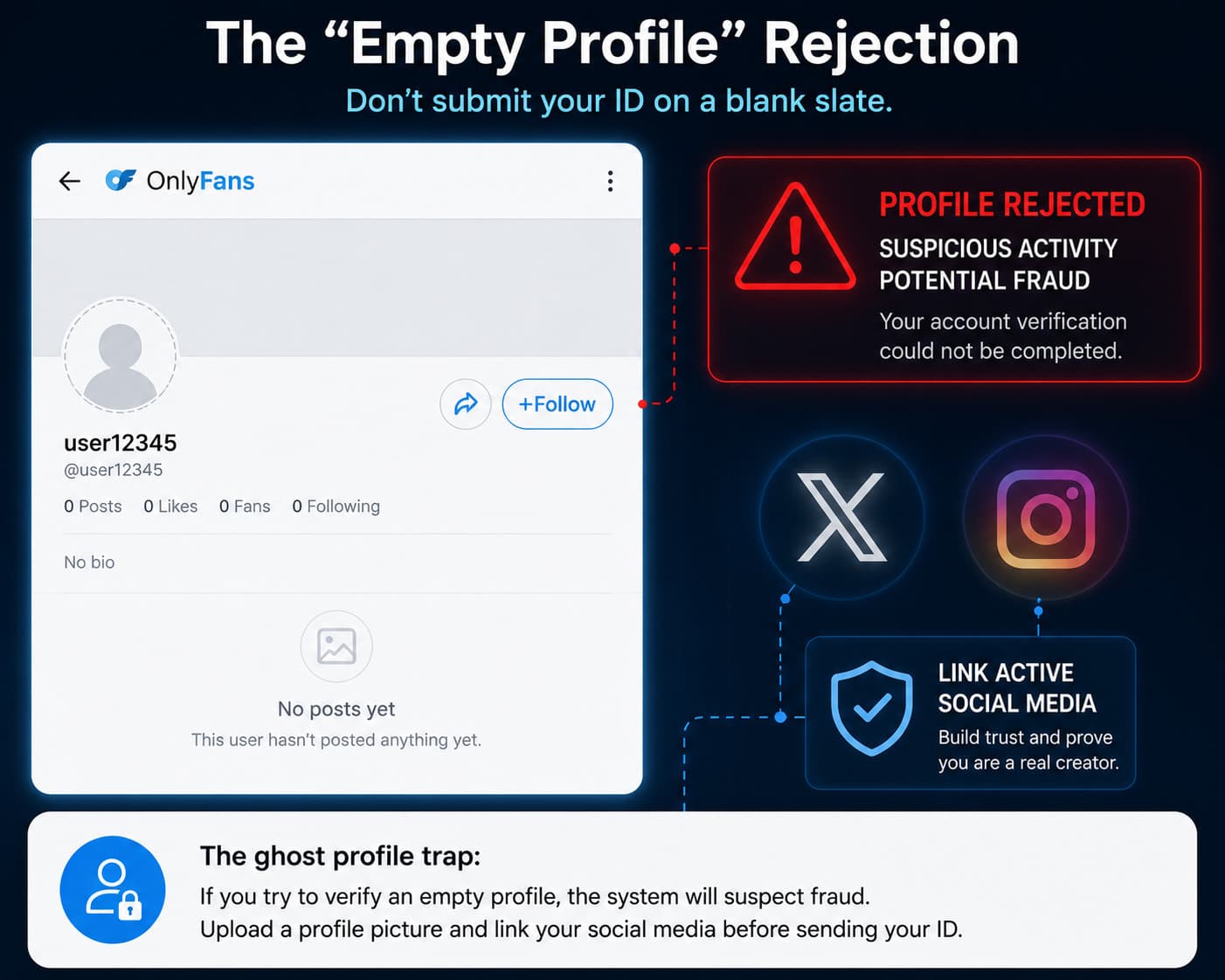
When automated algorithms pass an application to secondary human compliance reviewers, reviewers reject ghost accounts:
- Upload a clear, high-resolution profile photo and matching header banner.
- Write a complete, professional bio describing the content themes you will provide.
- Ensure your display name matches your creator brand while your legal settings reflect your government identity.
Connecting Social Media Accounts for Accelerated Validation
One of the most powerful methods to bypass prolonged manual verification queues is linking an active, verified external social media profile.
OnlyFans requires creators to link at least one established public social account (such as X/Twitter, Instagram, TikTok, or YouTube). The compliance algorithm evaluates these accounts to verify that you are a genuine human creator with an authentic digital presence:
- Account Longevity: Link an account that is at least several months old. A brand-new social media account created 10 minutes prior will raise automated fraud flags.
- Active Post History: The linked profile should contain public photos of yourself that match the facial features shown on your government ID.
- Public Visibility: Set your linked social media profile to public during the verification review window. Private accounts cannot be crawled by compliance verification crawlers.
Bank Account Name Matching: Preventing Payout Holds
Once your identity verification is approved, you must submit your banking details to activate your creator payout wallet.
The single most critical rule of creator banking is strict legal alignment:
- The legal name registered on your OnlyFans creator verification must match the account holder name on your bank account identically.
- If your government ID reads "Jane Elizabeth Doe," your linked bank account or payout gateway cannot be registered to a spouse, friend, business partner, or conflicting entity name unless you have completed formal corporate entity onboarding.
- Any mismatch between your verified KYC identity and your receiving banking credentials will trigger an immediate payout hold and secondary compliance audit.
Verification Troubleshooting Matrix: Diagnosing Common Rejection Codes
| Error Message / Issue | Root Cause | Exact Solution |
|---|---|---|
| "ID Document Unreadable / Blurry" | Camera blur, low resolution, or motion | Use natural lighting, steady your camera against a table, and clean your camera lens |
| "Glare Detected on Document" | Camera flash reflecting off laminate | Turn off flash completely; position yourself near indirect natural window light |
| "Document Edges Cropped" | Frame too tight around ID card | Pull camera back so all 4 corners of the ID have at least 1/2 inch of background margin |
| "Face Not Matching Document" | Heavy makeup, glasses, or biometric mismatch | Remove glasses, wipe off heavy contouring, and mimic the neutral expression on your ID |
| "Expired Document" | Identification card has lapsed | Only unexpired documents are accepted; renew your driver's license or passport |
| "Social Media Verification Failed" | Linked profile is private, new, or empty | Link a public, active social account containing historical photos matching your face |
| "Name Discrepancy" | Nickname used instead of full legal name | Ensure legal name field exactly mirrors the spelling on your government document |
Secondary Creator Verification: 18 U.S.C. 2257 Rules for Collaborations
If you plan to produce collaborative content featuring any other individual (including a romantic partner, guest model, or fellow creator), OnlyFans mandates strict secondary verification:
- Every individual appearing in photos, videos, or audio recordings on your page must possess an active, verified OnlyFans creator account.
- Before publishing collaborative media, you must tag the verified co-creator using the platform's native tagging tool.
- Publishing content featuring untagged or unverified third parties violates platform Terms of Service and will lead to immediate post removal, temporary account suspension, or permanent deplatforming under federal age verification compliance rules.
Frequently Asked Questions (FAQ)
How long does OnlyFans verification take in 2026?
Automated AI verification typically processes within 2 to 6 hours. However, if your submission is flagged for secondary manual review by human compliance agents, the process can take between 24 and 48 hours. Submitting during standard business hours (Monday through Friday) generally accelerates manual review times.
Can I get verified on OnlyFans with an expired ID?
No. OnlyFans strictly rejects all expired identification documents without exception, even if the expiration date passed recently. You must present an active, currently valid passport, national ID, or driver's license.
Can you be verified on OnlyFans if you are under 18?
No. OnlyFans enforces an absolute, non-negotiable minimum age requirement of 18 years old. Attempting to submit altered documents or falsified birthdates constitutes federal fraud, resulting in permanent blacklisting of your identity, device ID, and banking details.
What should I do if my verification gets rejected multiple times?
If you receive repeated automated rejections, do not repeatedly submit identical photos. Clear your browser cookies and cache, ensure your profile has an avatar and complete bio, link an active public Twitter/X account, retake your ID photo in natural daylight with zero flash, and reach out directly to OnlyFans Creator Support via email requesting manual compliance evaluation.
Is my personal ID information safe with OnlyFans?
Yes. OnlyFans encrypts all identity documentation using enterprise-grade bank-level encryption. Your legal name, government ID numbers, and private documents are never displayed publicly on your creator profile and are accessible only to certified compliance personnel for legal regulatory verification.