
How to Start an OnlyFans: Step-by-Step Profile Setup Guide

Leo Vance
Published: Aug 11, 2026 • 9 min read
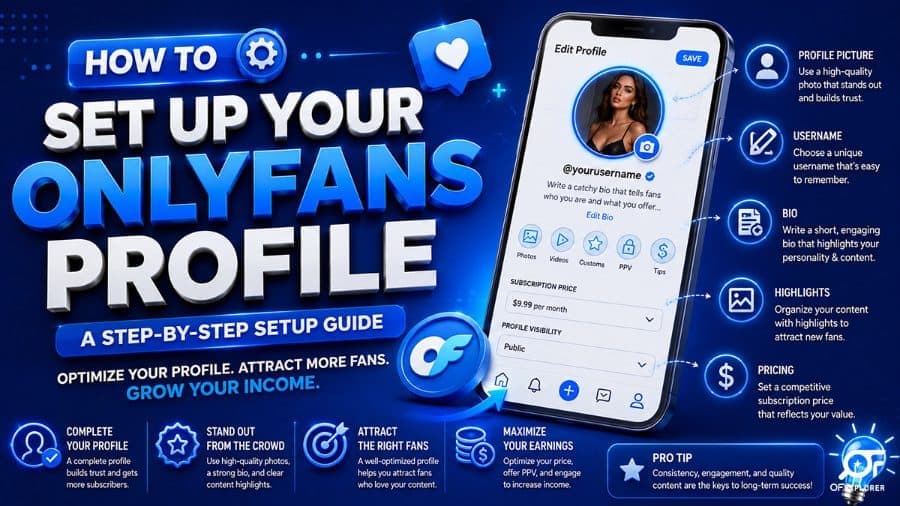
How to Start an OnlyFans: Step-by-Step Profile Setup Guide
Deciding to launch an OnlyFans account is a major entrepreneurial milestone. In 2026, the creator economy has matured from an informal side hustle into a multi-billion-dollar direct-to-consumer industry. Everyday creators, fitness coaches, artists, and glamour models are generating independent, life-changing income on their own terms.
However, entering the market today requires far more than snapping a few spontaneous smartphone selfies and waiting for subscribers to appear. The digital landscape is highly sophisticated. If your profile appears disorganized, spammy, or incomplete, prospective subscribers who click your link will bounce immediately without ever completing a purchase.
To build a durable, high-earning creator business and learn how to make money on OnlyFans, your profile must be engineered for conversion from the moment you launch. You must design a captivating storefront, configure critical privacy protections, establish data-backed pricing tiers, and implement a consistent OnlyFans content strategy to achieve your first 100 fans on OnlyFans.
In this exhaustive setup blueprint, we walk you through the seven sequential steps required to start an OnlyFans account from scratch, even if you are starting an OnlyFans without followers.
Step 1: Branding, Username Selection, and Persona Architecture
Your brand identity is your greatest commercial asset. Choosing a coherent, memorable creator name establishes professionalism and prevents confusion across external social platforms.
Display Name vs. Username (Handle)
OnlyFans differentiates between two distinct identity fields:
- Display Name: This is the prominent title displayed at the top of your profile. It can be changed at any time and can include emojis and promotional keywords. For example: Chloe May ❤️ (Daily Chat & 4K Drops) or Coach Marcus 🏋️ (Custom Hypertrophy).
- Username (Handle): This forms your permanent platform web URL (e.g.,
onlyfans.com/chloemay). Keep this handle as close as possible to your public X (Twitter), Instagram, and Reddit usernames. Avoid unnecessary numbers, underscores, or complicated spellings that fans might misremember when typing your URL.
Defining Your Content Niche
Do not attempt to appeal to everyone. Accounts that try to be everything to everyone fail to build loyal followings. Focus on a clear niche:
- Fitness & Athletic Conditioning: Hypertrophy splits, competition prep, meal plans.
- Cosplay & Gaming: Anime recreations, gaming vlogs, themed fantasy photoshoots.
- Glamour & Sensual Modeling: High-end lingerie, artistic photography, exclusive personal vlogs.
- Alternative & Gothic: Distinct body art, alternative fashion, tattoo culture.
Step 2: Designing Your Visual Storefront (Avatar and Banner)
When a prospective subscriber clicks your bio link, your profile picture and header banner are the only visual assets they can see before paying. They constitute your digital shop window.
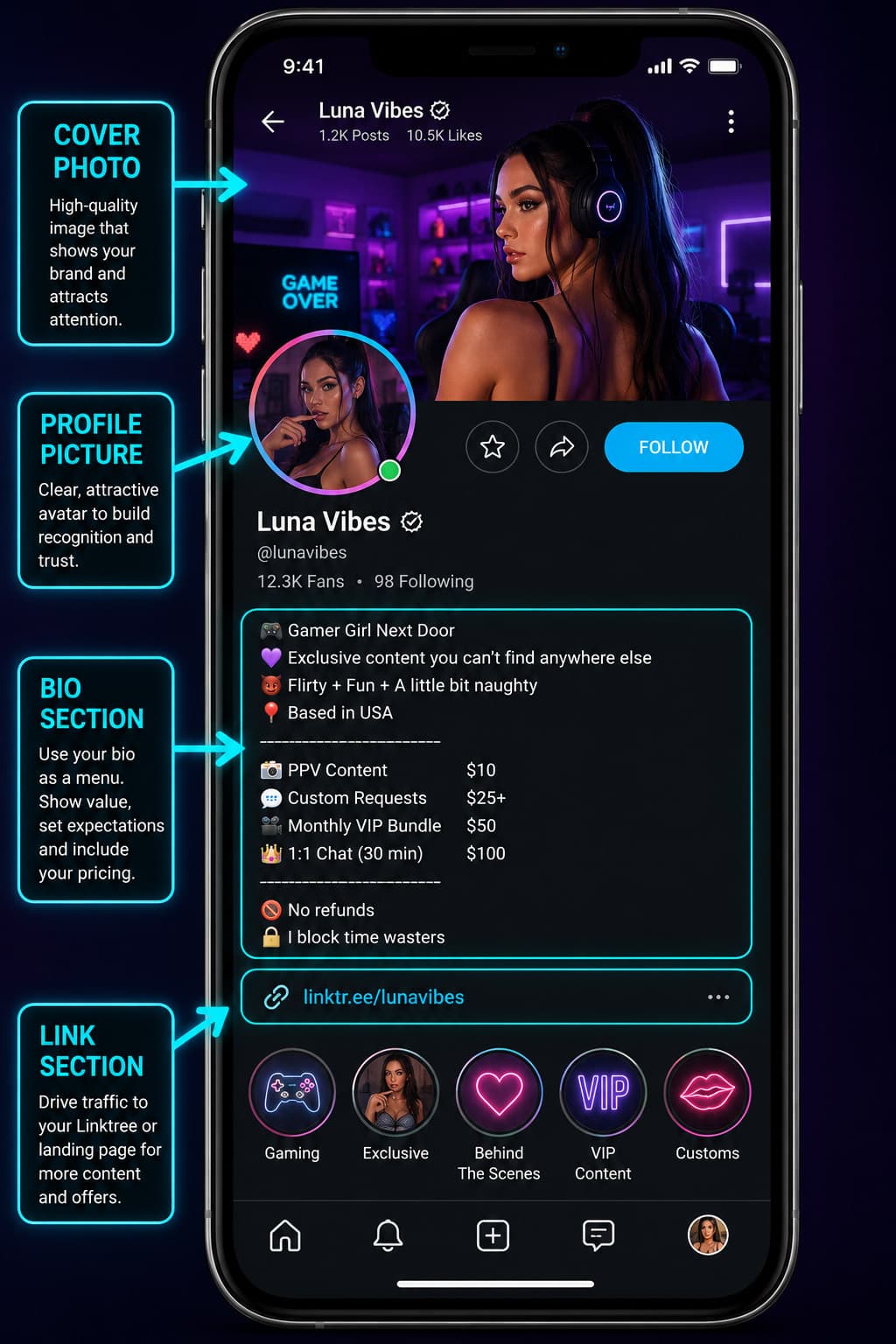
Avatar Guidelines (800x800 px)
- Use a high-contrast, professional, well-lit portrait.
- If you are a face-forward creator, ensure your facial features are illuminated and make direct eye contact with the lens.
- If you are operating as a faceless creator, showcase your signature aesthetic, distinctive silhouette, or key visual feature under dramatic lighting.
Header Banner Architecture (1920x1080 px)
Do not leave your header banner blank or use a generic scenic wallpaper. Utilize your header as a promotional billboard:
- Feature a high-resolution landscape photo showcasing your creator style.
- Include subtle text overlays highlighting your weekly posting schedule (e.g., "Daily Wall Posts • Direct 1-on-1 Chat • Exclusive 4K Drops Every Friday").
Step 3: Crafting a High-Converting Biography
Your bio is your primary written sales pitch. A disorganized bio that simply reads "Welcome to my page" leaves money on the table. A high-converting bio follows a proven four-part copywriting structure:
- The Compelling Hook: A playful, engaging opening statement establishing your personality and brand voice.
- The Exact Content Inventory: A clear bulleted list detailing what the fan receives upon subscribing:
- "Direct 1-on-1 private messaging with me (no agency chatters)"
- "Over 350 exclusive photos and 75 full-length 4K videos"
- "Daily feed uploads and unreleased behind-the-scenes vlogs"
- "Free surprise welcome video sent directly to your inbox upon joining"
- Explicit Boundaries: Clearly outline what you do and do not provide (e.g., "No in-person meetups; all requests handled exclusively through platform direct messages"). Setting boundaries establishes respect and filters out non-qualifying users.
- Direct Conversion Hook: Prompt the final click: "Subscribe now to unlock my pinned welcome gallery and start chatting today!"
Step 4: Privacy, Security, and Account Settings Configuration
Before driving public traffic to your profile, you must configure platform security settings to safeguard your personal life and intellectual property:
Activating Geoblocking
If you wish to prevent friends, family, or professional colleagues in your local area from viewing your profile, utilize OnlyFans native Geoblocking feature. In your security settings, you can block entire cities, states, or countries from accessing your profile URL.
Watermarking and Copyright Protection
Enable automated watermarking on all media uploads. OnlyFans will automatically stamp your profile handle and the viewing subscriber's unique user ID onto every photo and video. This serves as a powerful deterrent against unauthorized content leakage, as leaked media can be traced directly to the specific user who shared it.
Enabling Two-Factor Authentication (2FA)
Safeguard your earnings and personal account from unauthorized access by activating Two-Factor Authentication. Use an authenticator app (such as Google Authenticator) rather than SMS verification to protect against cellular SIM-swap attacks.
Step 5: Pricing Strategy and Multi-Month Bundles
Pricing your subscription requires balancing customer acquisition volume with healthy recurring profit margins:
| Pricing Model | Monthly Fee | Advantages | Considerations |
|---|---|---|---|
| Introductory Trial | $4.99 - $7.99/mo | Rapidly captures initial subscribers; low buying resistance | Requires aggressive pay-per-view direct messaging to scale |
| Market Sweet Spot | $9.99 - $14.99/mo | Psychological sweet spot; aligns with Netflix/Spotify pricing | Standard industry benchmark for sustainable solo operations |
| Premium Niche | $15.00 - $24.99/mo | High perceived value; ideal for specialized cosplay or fitness | Requires consistent high-production video releases |
| All-Inclusive VIP | $25.00 - $49.99/mo | Zero paywalls; fans enjoy unrestricted access to all media | Requires extensive initial content library |
Configuring Multi-Month Subscription Bundles
Offer discounts for extended upfront commitments to reduce monthly churn:
- 3-Month Bundle: 15% discount (secures upfront quarterly cash flow).
- 6-Month Bundle: 25% discount (locks in dedicated fans).
- 12-Month Annual Pass: 35% discount (provides substantial upfront capital for production equipment).
Step 6: Seeding Your Content Vault Before Launch
One of the most catastrophic mistakes a new creator can make is promoting an empty profile. If a prospective subscriber pays $12 to unlock your page and discovers only two photos and zero videos, they will immediately cancel auto-renew and dispute the transaction.
Follow the Rule of 30:
- Upload a minimum of 25 to 30 high-resolution posts before sharing your link publicly.
- Maintain a balanced ratio: roughly 60% high-quality photo sets, 25% short teaser video clips, and 15% full-length exclusive features.
- Schedule your posts across multiple past dates so your profile timeline appears established, active, and consistently maintained.
Step 7: Launch Day Execution and Traffic Funnels
Once your storefront is optimized and your vault is stocked, initiate your multi-channel promotional launch:
- Launch a Limited Welcome Promotion: Set up a promotional campaign offering "40% off your first month for the first 50 subscribers." This creates artificial scarcity and gives early followers an urgent reason to purchase immediately.
- Deploy Compliant Bridge Funnels: Share compliant, high-aesthetic teasers across Reddit, X, and Instagram. Direct prospective fans to a clean landing page bridge rather than posting raw OnlyFans URLs on censored platforms.
- Engage Early Adopters: Respond personally to every new subscriber within minutes of their arrival. Send an authentic welcome voice note thanking them for joining. Early personal intimacy converts one-time buyers into lifetime high-spending superfans.
Complete Launch Day Checklist
| Launch Phase | Milestone Task | Status |
|---|---|---|
| Step 1 | Verified government ID & linked matching bank account | Mandatory |
| Step 2 | Profile avatar & header banner uploaded in high resolution | Complete |
| Step 3 | Bio crafted with hook, content menu, boundaries, and conversion hook | Complete |
| Step 4 | Two-Factor Authentication and media watermarking activated | Complete |
| Step 5 | Subscription price set ($9.99 - $14.99) with 3-month bundles | Complete |
| Step 6 | Content vault pre-populated with at least 30 posts | Complete |
| Step 7 | Launch promotion created and shared across external socials | Active |
Frequently Asked Questions (FAQ)
Can I start an OnlyFans without anyone in my real life knowing?
Yes. Many successful creators protect their real-world identity by operating under creative pseudonyms, utilizing platform geoblocking to restrict access from their home region, and filming content as faceless creators using strategic lighting, wardrobe, and camera angles.
How much money do you need to start an OnlyFans?
Starting an OnlyFans requires $0 in initial platform fees. The platform is completely free to join and charges no monthly hosting subscriptions. You only need a modern smartphone with a capable camera, basic natural window lighting or an affordable ring light ($25 to $40), and an internet connection.
How do beginners get their first subscribers?
Beginners acquire their first subscribers by actively marketing on external platforms, primarily Reddit and X (Twitter). By sharing high-contrast teaser media in niche-specific subreddits and networking with fellow creators in cross-promotional retweet groups, new creators can drive targeted traffic directly to their page.
What is the best subscription price to start with?
For most beginners, pricing between $9.99 and $12.99 per month—paired with a temporary 30% to 50% introductory discount for the first 50 subscribers—delivers the optimal balance between high conversion rates and respectable baseline monthly revenue.
How often should a new creator post on OnlyFans?
New creators should aim to post on their feed at least 1 to 2 times daily during their first two months of operation. Maintaining a high, predictable posting cadence reassures subscribers that the page is active and justifies their ongoing monthly renewal.
💡 Related Analysis: Read our detailed breakdown on What is OnlyFans? Complete Beginner Explanation.
💡 Related Analysis: Read our detailed breakdown on Official OnlyFans Creator Requirements and ID Verification.