
How to Delete an OnlyFans Account Permanently: Step-by-Step Guide for Fans & Creators

Leo Vance
Published: Sep 3, 2026 • 9 min read
Whether you are a casual consumer seeking to completely eliminate your digital entertainment footprint, or a content creator transitioning toward mainstream corporate pursuits, knowing how to delete an OnlyFans account is a vital digital privacy skill.
While turning off individual auto-renewals on creator profiles stops future monthly credit card charges, it leaves your personal profile, email credentials, direct message histories, and payment tokens active in the platform’s databases. For users seeking absolute finality, complete account deletion is the only mechanism that severs your profile, renders your username inaccessible, and schedules your data for permanent eradication.
However, deleting an OnlyFans account is an irreversible operational action. Once confirmed, you permanently surrender access to all previously purchased pay-per-view (PPV) assets, forfeit unspent platform wallet credits, and permanently wipe all messaging archives. Furthermore, content creators face specific legal and financial prerequisites that must be satisfied before the platform permits account closure.
In this comprehensive operational guide, we provide step-by-step instructions for permanently deleting both subscriber and creator accounts across mobile and desktop devices, detail what data is eradicated versus what must be legally retained under federal statutes, and troubleshoot common roadblocks that prevent accounts from closing.
Deletion vs. Unsubscribing: Understanding the Difference
Before executing an account wipe, it is critical to distinguish between the three levels of account departure:
| Inactivity Level | User Action Taken | Impact on Purchases & Profile Data |
|---|---|---|
| Level 1: Unsubscribing | Disables auto-renew on individual creator memberships | Stops future billing; preserves full account, past purchases, and chat history |
| Level 2: Card Removal | Deletes saved credit or debit cards from billing settings | Prevents accidental charges; maintains profile and unlocked media vaults |
| Level 3: Account Deletion | Initiates permanent profile termination in account settings | Irreversible: purges login, forfeits wallet credits, and wipes profile |
If your objective is simply to take a temporary break or prevent recurring credit card charges, canceling your active subscriptions and removing your payment methods is recommended. If your goal is total eradication, proceed with permanent deletion.
Critical Prerequisites Before Deleting Your Account
Before clicking the confirmation button, you must review three vital operational constraints:
1. Spend or Forfeit Wallet Credits
If you maintain an active platform "Wallet Balance" (funds loaded via gift cards or previous top-ups), OnlyFans will NOT refund unspent wallet credits upon deletion. That money is permanently forfeited. Spend your remaining credits on tips or PPV unlocks prior to initiating closure.
2. Back Up Important Media
Once deletion is processed, you permanently lose access to all pay-per-view (PPV) videos, custom commissions, and direct message exchanges. If you purchased exclusive media you wish to preserve, ensure you view it before terminating the profile.
3. Creator Payout Clearances (For Creators Only)
Creators cannot simply delete an account with pending royalties. You must withdraw all cleared funds from your Current Balance. If you have active paying subscribers who paid for a 30-day cycle, OnlyFans will not immediately delete your account; it will schedule your profile for deletion at the conclusion of your last subscriber's active billing cycle to prevent consumer fraud.
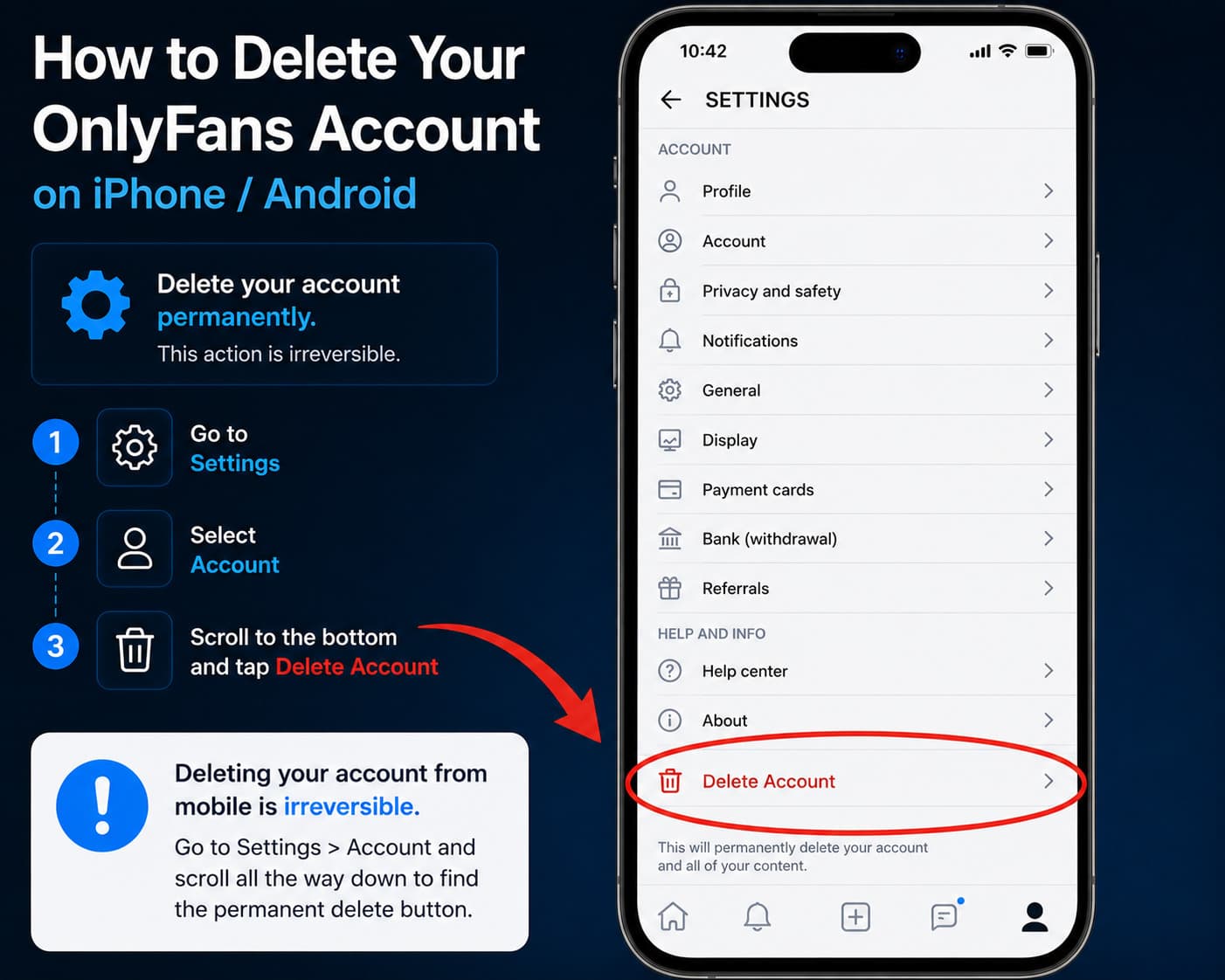
How to Delete an OnlyFans Account on Mobile (iPhone & Android)
Because OnlyFans operates as a Progressive Web Application (PWA) accessed through mobile browsers, you execute account deletion directly within Safari, Chrome, or Firefox:
- Log In: Navigate to
OnlyFans.comon your mobile browser and enter your credentials. - Open Profile Menu: Tap your Profile avatar icon located at the far right of the bottom navigation bar.
- Select Settings: From the slide-out navigation menu, tap on Settings.
- Access Account Tab: Tap on the Account option (typically the first entry in the settings menu).
- Locate Deletion Section: Scroll all the way to the bottom of the Account settings page.
- Tap Delete Account: Tap the prominent red button labeled Delete Account.
- Enter Verification Code: OnlyFans will prompt you to enter a dynamic CAPTCHA security code and, if configured, an authentication code from your two-factor authenticator app or registered email address.
- Final Confirmation: Tap the final red confirmation button. Your account will immediately be logged out and queued for permanent database removal.
How to Delete Your OnlyFans Account on PC / Desktop
If managing your account from a desktop or laptop computer:
- Open your web browser and log into
OnlyFans.com. - In the left-hand primary navigation sidebar, click on More (the three horizontal dots icon).
- Select Settings from the expanded menu.
- Click on Account in the central settings column.
- Scroll down to the bottom of the page to find the Account Management section.
- Click the red Delete Account button.
- Enter your master account password along with the visual verification numbers displayed on the screen.
- Click Delete to finalize the action.
What Happens Behind the Scenes When You Delete Your Account?
When you complete the deletion workflow, OnlyFans executes a multi-stage database decoupling process:
| Deletion Phase | Operational Server Action | User & Public Visibility |
|---|---|---|
| Day 0: Confirmation | Active session terminated; login credentials invalidated | Public profile displays an immediate 404 error; DMs labeled as "Deleted User" |
| Days 1 – 30: Purge Queue | Account queued for media asset eradication across CDNs | Media cached on edge servers permanently marked for automated garbage collection |
| Days 30 – 90: Database Eradication | User identifiers stripped from production cluster shards | Core personal records purged from active databases (statutory logs archived) |
1. Immediate Public Disappearance
The moment deletion is confirmed, your username becomes instantly inactive. If someone attempts to navigate to your profile URL (onlyfans.com/yourusername), they will encounter a "Page Not Found / 404" error.
2. Message Obfuscation
In the inboxes of creators or friends you chatted with, your username will change to a generic string (e.g., "Deleted User"), and your profile avatar will be replaced by a blank placeholder.
What Data Gets Erased vs. What Must Be Legally Retained?
A critical question for privacy advocates is whether deleting an account truly wipes 100% of your digital footprint from Fenix Internet LLC's enterprise servers.
Under international privacy statutes (such as the European Union’s GDPR and California’s CCPA), users possess a fundamental "Right to be Forgotten." However, this right is legally subordinate to federal criminal statutes, taxation reporting laws, and anti-money laundering (AML) regulations:
| Data Type | Fate Post-Account Deletion | Governing Legal Framework |
|---|---|---|
| Profile Photos, Bio & Feed Posts | Permanently Erased from public servers | Platform Privacy Policy |
| Direct Message Transcripts | Removed from active search; archived in server logs | Legal Dispute Resolution Policy |
| Credit Card Billing Records | Retained for 7 Years | Anti-Money Laundering & Banking Mandates |
| Creator KYC Scans (ID & Biometrics) | Retained Permanently / Minimum 7 Years | 18 U.S.C. 2257 Federal Age Compliance |
| Tax Records (W-9 / W-8BEN) | Retained for 7 Years | IRS & International Tax Directives |
While your public persona and social footprints are completely wiped from the internet, financial ledgers and creator identity verification records are preserved under statutory legal compulsion to combat fraud and verify participant age compliance.
Troubleshooting: Why Won't OnlyFans Let Me Delete My Account?
Occasionally, users encounter an error message preventing them from completing the deletion process. If you encounter an error stating "Account cannot be deleted," it is almost always caused by one of these three roadblocks:
- Active Creator Subscriptions: If you are a creator and still have paying subscribers whose active 30-day billing periods have not concluded, OnlyFans blocks immediate deletion to protect consumer rights. You must set your profile subscription fee to "Free", disable new subscriptions, and wait up to 30 days for existing subscriptions to lapse naturally before triggering deletion.
- Pending Financial Clearances: If you have pending creator withdrawals or unresolved payment chargebacks, the system locks account closure until all financial ledgers balance to zero.
- Two-Factor Authentication (2FA) Lockouts: If you lost access to your authenticator app or email, you cannot generate the final authorization code required for deletion. You must contact
support@onlyfans.comwith government identification to recover authentication access before deleting.
Frequently Asked Questions
Is deleting an OnlyFans account permanent?
Yes. Deleting your OnlyFans account is 100% permanent and irreversible. Once confirmed, your profile, direct message history, subscriber connections, and access to all purchased pay-per-view media are permanently lost.
Can you reactivate a deleted OnlyFans account?
No. Unlike social platforms like Facebook or Instagram that offer a 30-day "grace period" during which logging in reactivates the account, OnlyFans treats deletion as a permanent purge. If you wish to use the platform again, you must register a brand-new account.
What happens to the money left in your OnlyFans wallet when you delete your account?
Any remaining balance stored in your OnlyFans digital wallet is permanently forfeited upon account deletion. The platform does not issue cash refunds for unspent wallet credits. Ensure you exhaust all wallet funds prior to deleting.
Does OnlyFans keep your credit card information after you delete your account?
While your saved credit card is removed from your active profile and cannot be billed again, OnlyFans’ third-party PCI-compliant payment processors legally retain historical transaction ledgers for up to seven years to comply with international anti-money laundering and tax accounting laws.
Can someone take your old username after you delete your account?
Yes. Once an account is fully purged from the platform database, the associated username is eventually released back into the public namespace and can be registered by new users.
Related Account & Security Guides
- How to Cancel an OnlyFans Subscription (Stop Auto-Billing)
- How to Recover a Locked or Suspended OnlyFans Account
- What Data Does OnlyFans Collect? Privacy & Forensic Audit
- OnlyFans Payment Methods: Credit Cards & Billing Security
- Is OnlyFans Private? Bank Statements & Security Truths
- OnlyFans Security Tips: Protecting Your Identity